Account and privacy
Your details, your properties, and what stays private.
- Profile has your name, currency and addresses
- Nothing is public until you publish
- You choose which parts of an address show
Your profile
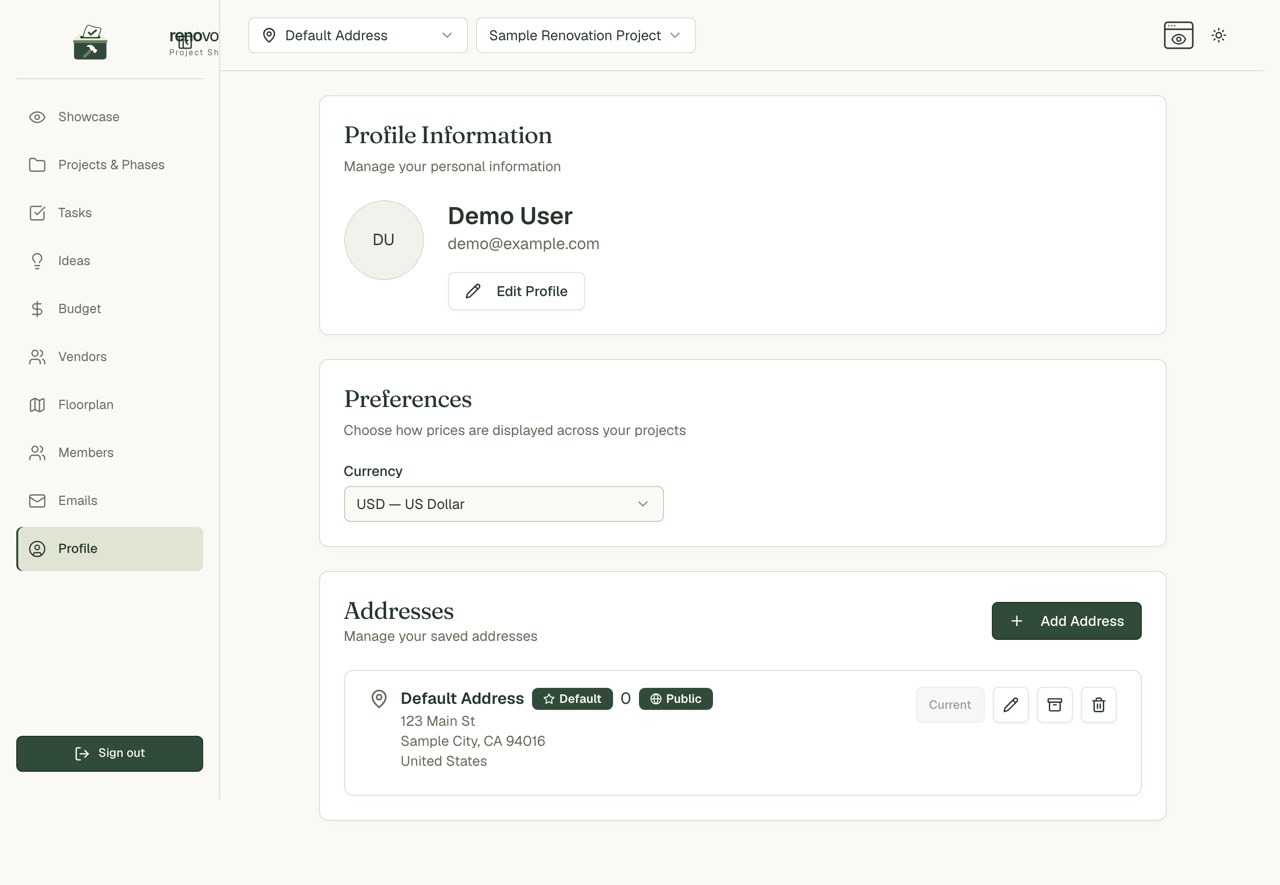
- Edit Profile changes your first and last name.
- Your email address is shown but cannot be changed here.
- Currency sets how prices show. Choose USD, CAD, EUR, GBP or AUD.
- Sign out is in the menu.
Your addresses
Under Addresses you can:
- Add Address for a new property
- edit it with the pencil
- mark one as your default with the star
- make one Current to work in it
- archive it with the box icon, or delete it with the bin
Each address has a Public Address switch. Off means it cannot appear on your public projects.
Choose what the public sees of an address
Even a public address lets you pick which parts show:
- property name
- street address
- city
- state or region
- ZIP or postal code
- country
Tip: You can keep a property public and hide all of them.
What stays private
- Nothing is public until you publish.
- You choose what goes on the showcase.
- Hidden items are left out of public totals, so a hidden cost never changes the budget visitors see.
- Vendors and the cost breakdown are hidden until you switch them on.
- Visitors cannot see who is in your project.
See Sharing and showcase for the switches.
Invitations
- They go to the email the owner enters.
- They last seven days.
- The owner can resend or cancel them.
- Not expecting one? Just ignore it.
Common questions
Can I change my email address? Not from the app.
How do I switch to dark mode? Use the sun icon at the top right.